Posts

LazPaint 7.3 Released 🎉

A new version of LazPaint is out: 7.3 ! This release focuses on improving compatibility with modern systems and making the software more accessible to beginners. For example, users will now be informed if their selected color is fully transparent, a small but helpful change to prevent confusion when nothing appears to be drawn. All translations are now complete : so if your language appears in the dropdown menu, you can expect a fully localized interface! New Features: 🖐️ Improved Hand Tool: Clicking on a shape while using the Hand tool now automatically switches to editing that shape. ✨ New Geometrical Shapes: You can now render hypocycloids and superformula shapes, perfect for creative and mathematical designs. Available Packaging: LazPaint is available on all major platforms through: Scoop (Windows) Flatpak (Linux) Snapcraft (Linux) Homebrew (macOS) 👉 Download LazPaint 7.3 on GitHub Try it out and let us know what you create!

Bug fixes and compilation fixes

I have been busy and needed to take time for myself and in the meantime, bug reports have accumulated. Also the Debian version doesn't compile due to a new version of Lazarus/FPC has been released. I've have been sorting the issues and fixed some of them. When I am satisfied that enough bugs are fixed, I will publish a new release. There are a lot of duplicates in the issues reported. When reporting a bug, please check that it hasn't been already reported .

SVG support with version 7.1.6

Going forward with vector support and interoperability, LazPaint can now read and write layered SVG files and SVG layers in OpenRaster. So for example, you can draw vector shapes and save them as SVG. The file can then be opened in an SVG editor. In particular, with Inkscape the layers information is also available. Conversely, if you prepare a layered SVG in Inkscape, you can open it in LazPaint and you will see each layers and be able to transform then or change their visibility. Text and curves are supported, the only limitation for now is when using texture filling and phong shading which are a bit complicated to handle in SVG. The OpenRaster format also allows to add SVG layers. Similarly, you can make a layered image in LazPaint, use vector shapes and save it as OpenRaster. You can open it in various software that supports OpenRaster with SVG: DrawPile, Chasys Draw and MyPaint. If the target software does not handle SVG, you can first rasterize the layers. There is a but...

Getting LazPaint into Debian

Version 7.1.5 has been released, fixing some minor interface problems. That's all great, though LazPaint still isn't included in Debian distributions on Linux. For now, I have been producing an installable Deb file, which works fine. I had to do some research and testing to get it right. I have written what I learnt in the process on FreePascal wiki:  Debian package structure This not yet available in Synaptic but there is some progress and it seems that I finally got an upstream source that could be compatible with Debian distributions. Here is the  issues  thread on GitHub. It has been a long process, because there is no so much documentation about it, and even less regarding projects using Pascal language. People that know about Debian packaging do not have much spare time and they are used to C language projects.

LazPaint 7.1.4 stable finally?

 It feels like this version is at last stable and works fine on Windows, Linux and MacOS. Regarding MacOS, it is now optimized as the other versions and it handles Retina display. I am happy to get there as I really want to have one version that has no bugs and no significant problems, before doing a new version with new features. It is similar to version 6.4.1 but with vector objects and various improvements on the tools and interface. I am thinking about creating a forum so that users can exchange tips and that could help gather resources around the program, for example Python scripts.

Fixing version 7.1.1

Some bugs have been found in the latest version, so I am fixing those. It is frustrating that even if alllocating time to test, some bugs still slip through. Maybe having a longer test period next time?

LazPaint 7.1.1

Image
 Using texture filling with shaded shapes   What's new compared to version 7.0.7 Files   * read/write support for WebP images using libwebp   * read support for RAW images using dcraw   * read support for Portable Any Map (PBM, PGM, PPM)   * fix loading PDN images   * show progress of loading/saving/actions on layered images Interface   * less flickering during action progress   * minor scaling improvements   * dark theme for status bar   * add Donate tool button   * separate color for background and outline   * fix remember save file extension Tools   * fix updating transparent colors   * fix release of middle mouse button   * fix gradient undo/redo   * optimize layer transform   * scripting in Python   * script for layer effects: color overlay, drop shadow, inner light, stroke   * more scripts: split/merge channels, mask   * vectorial tools: gradient and texture fill for vec...

New beta version LazPaint 7.0.9

Many features that I talked about in the previous post have been implemented. I feel like the software is complete enough to be released. To check the latest version see: https://github.com/bgrabitmap/lazpaint/releases Regarding colors splitting channels into RGB/HSL : that can be done using the Script menu. lighten/darken mode has been added to the eraser picking up color by holding the SHIFT key when using a pen or a brush tool   Regarding vectors vectorial multi-selection in the edit shape tool (holding CTRL to select more shapes) adding holes in a polygon using SHIFT-click  Regarding layers  layer effects are available in the Script menu (drop shadow, inner light, inner shadow, color overlay, stroke) alpha mask can be added in the layer stack using Script menu, though it is not associated with a layer in particular, it is applied to all layers underneath Regarding interface tools items are grouped. The group is shown when hovering the tool ic...

Possible enhancements for future versions

There are more than 20 possible enhancements that have been suggested and that I've listed in the "issues" tab of LazPaint's repository: https://github.com/bgrabitmap/lazpaint/issues Regarding colors : L*a*b* color adjustment Split/join RGB/HSL channels Lighten/darken mode (maybe in Eraser tool?) Pick up color without having to change current tool Palette edition that would preserve color indices Regarding vectors : Vectorial selection (to allow to save a polygonal selection for example) Vectorize a layer, i.e. transform a raster layer into polygons that matches the drawing Interface for pen and background gradients and texture (it is implemented in the library so it is just the interface to do) improve text toolbar (RTL text, editing font family directly) Allow to draw sub polygons (to make multiple polygons or to make a hole in a polygon) Regarding layers : layer effects layer groups alpha mask export/import layer stack as a series of GIF...

LazPaint v7.0.7 (bug fixes, vector edit improvement)

New version 7.0.7 with bug fixes. I recommend to update. There are as well various improvements. In particular, it is possible to merge vector layers while keeping vectorial information, one can select very thin shapes (thanks to a margin for the click) and the edit shape tool has been improved to work in more cases. Nouvelle version 7.0.7 avec des corrections de bugs. Je vous recommande de mettre à jour. Il y a aussi diverses améliorations. Notamment on peut fusionner des calques vectoriels en gardant l’info vectorielle, on peut sélectionner des formes très fines (une marge pour le clic est admise) et l’outil d’édition de formes vectorielles a été amélioré.

New stable version of LazPaint 7.0.6

Image
A new version of LazPaint is at last available. It has vector shapes, though gradients within shapes are not supported yet. Apart from that, you can edit shapes after they are drawn, move them over/under other shapes within the layer, etc. Download When editing a shape, there are control points. Pressing SHIFT or ALT will give you alternative effect of those points. In particular, with ALT, corner points allow to rotate and resize, and side points allow to shear, i.e. move one axis relative to the other one to draw a parallelogram. If that's not enough, you can transform a shape into a curve, and then add or remove points. The key Delete will delete the point you are hovering and the keys Insert or I will insert a new point at mouse location. Support for ICO, GIF and TIFF has been improved. It is possible to edit/add/remove frames within those files. Also TIFF support a wider variety of pixel formats. A dark theme is available, in case you work at night or just like it da...

Vector layers

Image
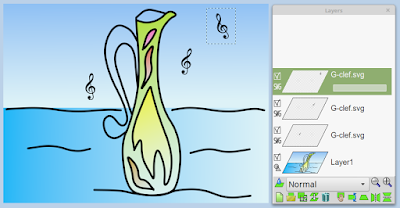
Vector tools have been developped in a piece of separate software. Now I am making LazPaint compatible with those new vector layers. So that they can be loaded, moved and rotated. Also SVG files can be loaded as vectorial. In the example below, the background and the bottle were made in the vector program and the music symbol is one SVG that is duplicated and moved around. Les outils vectoriels ont été développé dans un logiciel séparé. A présent, je rend LazPaint compatible avec ces nouveaux calques vectoriels. Ainsi ils peuvent être chargés, bougés et tournés. Les fichiers SVG également peuvent être chargés en vectorial. Dans l'example ci-dessous, le fond et la boutille sont faites avec le programme vectoriel et le symbole musical est un SVG qui est dupliqué et déplacé.

Gradients on vector shapes

Image
Progressing on the vector shapes. They will be filled with either a solid color, a gradient or a texture. Below is an image made with gradients only. The gradient in the sun is being edited. Radial gradients can have focal point. Here it is on the top-left of the shape (the little arrow). The big arrow is the main radius (or ending radius). The gradient of the rainbow is a radial gradient as well but interpolated on the corrected HSL colorspace.

The vectorial road to success

Image
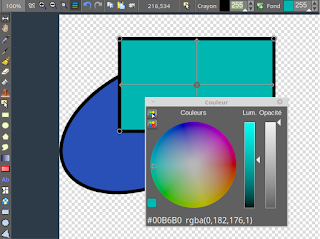
With vectorial shapes, objects can be resize after the object has been created. However, if the brush or any other non-vectorial tool is used, the image will be rasterized. In order to have both, it will be necessary to have multiple layers to keep the coordinates of the vector shapes or not. In the following example, there are three objects : a rectangle with solid color, a rotated rectangle with a texture and a rotated ellipse with half-opaque color.

Some news

Hi! It's been some time since I have published something about LazPaint. So here are some news. I have at last some spare time to continue this project. For now I have been working on the graphics library BGRABitmap which is used in LazPaint. If you're interested in Pascal programming, you will find information about it on Lazarus forum . I've added some features that I hope to put in action in LazPaint. The biggest feature that has been asked basically is to go towards vector and to have text layers. That's a quite a challenge. In all cases, I thank you all for you support and for your love.

New version coming soon

Hello! A new version of LazPaint is coming. Improvements of the interface: scrolling with the middle mouse button status bar showing the size of the selection and the aspect ratio more progressive zoom with the sheel configuration of the size of the icons (however not for the horizontal toolbar yet) faster startup with low speed Internet connection by using threads and checking for a new version only once a month  File format improvement: GIF format fixed for compatibility with Photoshop Saving Bmp MioMap/iGo files Tools and filters improvement better quality of gradient tool with 24bit dithering, dropdown to choose colorspace of gradients fix for linear transformation of the deformation grid quicker computation of blur filters, floating point value for radius more options for emboss filter And more.

LazPaint 6.4.1

Image
A new version of LazPaint is available (6.4.1). New tools and filters   Brush tool: you can specify the shape of the brush, load it from a file. It can contain a gradient of opacity. Clone tool: right click to set source location, and left click to duplicate. You can use it to remove an object from a photo or duplicate an existing object. Rain rendering: apply rain on the image so that it looks the weather changed Toolbar Added palette toolbar: load/save palettes in various formats, posterize or dither image Main toolbars can be hidden or shown by right-clicking them. Toolbox is docked inside the main window (left or right side) so that it is not in the way anymore Improvements and fixes When saving files as PNG, JPEG and BMP, the color depth or quality can be chosen. Output image and size is previewed Now 3d models are loaded with their textures and custom normals Fix for filters: effects are applied only on the selected area instead of the bounding r...

LazPaint 6.2

In order to fix some bugs and to take into account feedbacks a new quick version 6.2 has been released. Changelog: bug fixes improvement of toolbars now the size of the image is displayed in the title bar a slider allow to quickly change brush size and any value in the toolbar Files can be downloaded in our downloads section.